Restaurant Management System
Run Every Kitchen.
Serve Every Table.
Own Every Number.
Orders, kitchens, POS, queue, and reporting — unified in one powerful dashboard.
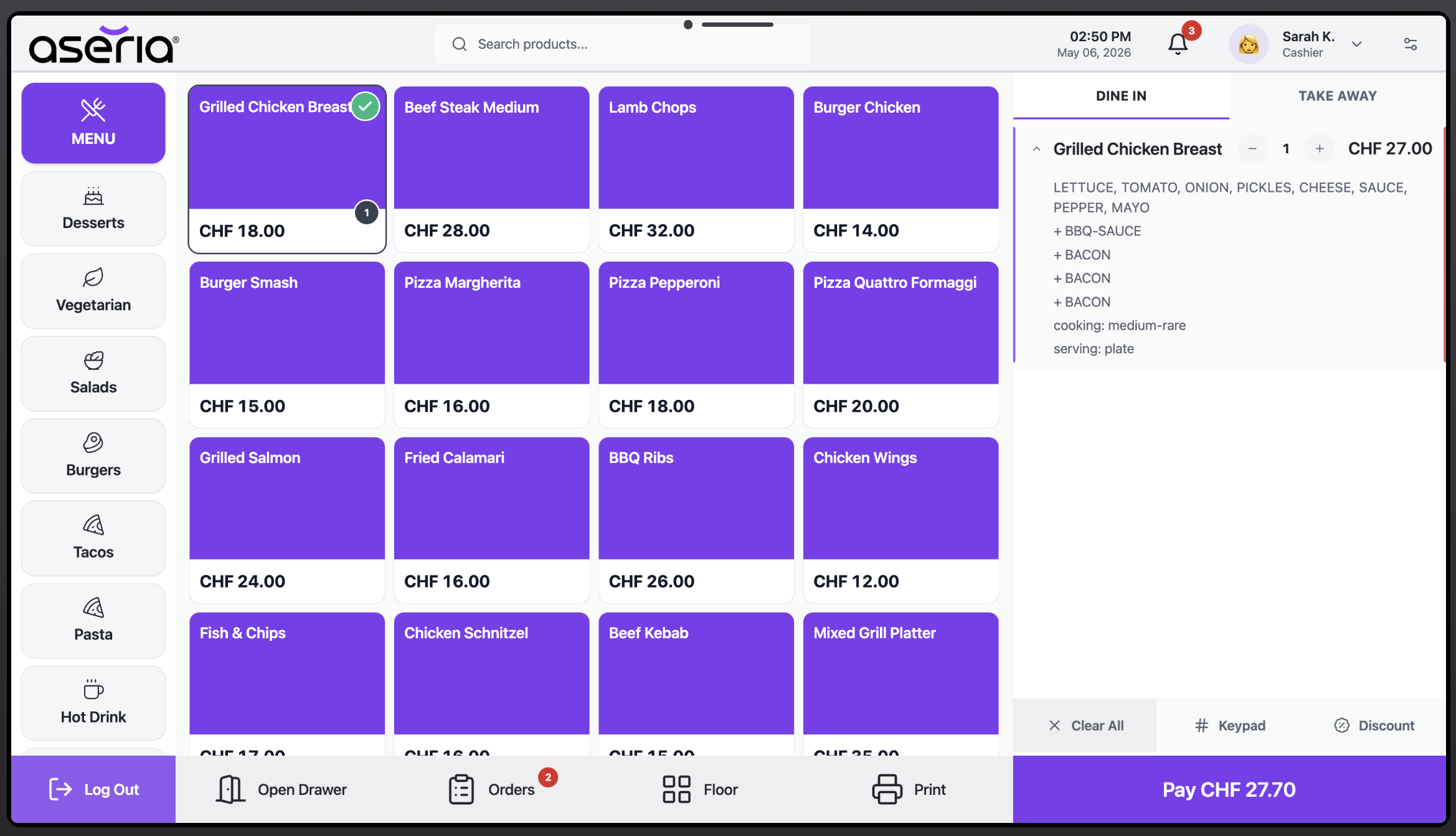
Orders, kitchens, POS, queue, and reporting — unified in one powerful dashboard.
Watch how orders move from POS to kitchen and back — seamlessly, in real time.
Built for speed, designed for scale. One platform that grows with every location you open.
Real-time order streaming to kitchen devices. Live prep tracking, device authentication, and instant status updates keep every station running at full speed.
Process sales on any terminal with multi-payment flexibility. Self-service kiosks keep queues short and staff focused on the guest experience.
Overall revenue, tax reports, Z-reports, and stock alerts — every figure you need to run a leaner, smarter business, available instantly across all locations.
Every tool your team needs — from the front of house to the back office, all connected and location-aware.
ASERIA links the front counter, self-service kiosk, kitchen stations, queue screens, payment flow, and owner reporting into one live operating loop.
Staff can enter orders from POS while guests place their own orders through e-kiosk, with table, takeaway, and payment context preserved.
Orders stream to kitchen devices in real time, where staff track prep, print slips or stickers, and move items through status updates.
Queue displays keep customer-facing order status visible, reducing counter questions and keeping service moving.
Revenue, taxes, Z-reports, stock movement, and daily summaries are updated from the same operational data.
Track the figures that matter during service and after closing: sales, taxes, Z-reports, best sellers, staff activity, stock alerts, and scheduled email reports.
ASERIA is built for real restaurant environments: Android devices, POS terminals, kitchen screens, printers, backups, issue tracking, and email automation.
Kitchen, POS, kiosk, and queue flows can run on dedicated Android screens with device login and assignment.
Print order slips, kitchen items, receipts, and labels from the screens your team already uses.
System errors and operational anomalies can be logged directly for developer visibility and follow-up.
Scheduled sales, tax, issue, and stock summaries can be sent to owners or managers automatically.
Database and server backups run automatically with retention and restore access from the admin panel.
Customer-facing screens show ready and in-progress orders, keeping guests informed during peak service.
Cash register sessions, multi-payment methods, receipts, and customer display flows stay connected.
Permissions and device access can be scoped by location, role, station, and operational responsibility.
No long onboarding. No complicated setup. Get your entire operation live and serving fast.
Add your restaurant locations, configure kitchen stations, and set up POS terminals and e-kiosks in minutes.
Build your product catalogue, set pricing, assign modifiers, define user roles, and give each team member the right access.
Orders flow in real time from POS and kiosk to kitchen. Track every order, close every shift, and analyse every sale.
Whether you operate one restaurant or a growing chain, every location is managed from the same unified dashboard — with full isolation of data, staff, and menus per site.
Most restaurants juggle a patchwork of disconnected systems. This platform replaces all of them — with one login, one dashboard, one bill.
Every person in your restaurant gets the right tools, the right access, and exactly the right view — nothing more, nothing less.
Your data is your business. We treat it that way — with enterprise-grade security, automatic backups, and an uptime commitment you can hold us to.
Everything you need to know before signing in for the first time.
Yes. The platform is built multi-location-first. Every location has its own scoped data — menus, staff, orders, and reports — while you switch between them seamlessly from a single login. Cross-location reporting is available from the central dashboard.
Orders placed through POS or e-kiosk are streamed instantly to kitchen devices in real time. Kitchen staff see a live order queue, mark items as in-progress or done, and can print order slips and item stickers directly from the kitchen screen. Each kitchen device authenticates independently.
You can export reports as PDF, PNG, or CSV depending on the report type. Scheduled reports are delivered by email as PDF attachments on a daily, weekly, or monthly basis. Z-reports and tax reports are formatted for direct submission to accountants.
Yes. The system runs automated daily backups of your full database and server state. You can view the backup history, check storage health, and trigger a restore from the Backup Management module in the admin panel. No manual intervention is needed.
Each user is assigned a role (e.g. Owner, Manager, Kitchen Staff, Cashier) with a granular permission set defined per role. Permissions control exactly which modules, pages, and actions each role can access — and these are scoped per location, so a manager at one site cannot see another site's data unless explicitly granted.
Yes. System errors and anomalies can be logged directly as issues in your GitHub repository in real time. A daily email digest also summarises any warnings, failed background jobs, or operational anomalies — so your development team stays informed without manual monitoring.
Yes. The landing page can be enabled or disabled from the Settings panel inside the admin dashboard. When disabled, guests who visit the root URL are redirected directly to the login screen without ever seeing the public page.
Roll out ASERIA location by location with a practical implementation flow that covers configuration, hardware, staff access, and go-live readiness.
Add each restaurant, define address details, operational settings, currencies, and location-specific data boundaries.
Configure categories, products, meals, modifiers, taxes, pricing, and kitchen routing for every sale channel.
Assign POS terminals, e-kiosks, kitchen screens, queue displays, printers, and cash registers to the right station.
Create staff users, assign roles, set permissions, and give each person only the modules they need for their work.
Open the cash register, place test orders, verify kitchen and queue flow, then start serving with live reports.
Sign in and have your first location running today.